
Technical SEO covers the settings that let search engines crawl, interpret and index the pages of a website correctly.
Are your best pages actually seen by Google, and read the right way?
In this guide, you’ll learn:
- how Google crawls, interprets and indexes a site (and where it most often gets stuck)
- the basic settings: robots.txt, XML sitemap, canonical tag, 301 redirects and error codes
- how speed, mobile, HTTPS, structured data and hreflang build on those basics
- where to start, with a checklist to work from
What is technical SEO?
Technical SEO deals with a site’s infrastructure rather than its copy: the server, the HTML code, the URLs, the files that crawlers read, page speed and how pages display on mobile. Its goal is simple: a crawler like Googlebot should reach every useful page, read it the way a visitor sees it and file it in the right place in the index. A remarkable article on a page missing from the index gets the same visibility as a draft. So before rewriting any copy, it pays to check that Google can see the page, whether you work alone or with an SEO agency in Montreal.
How Google crawls and indexes a site
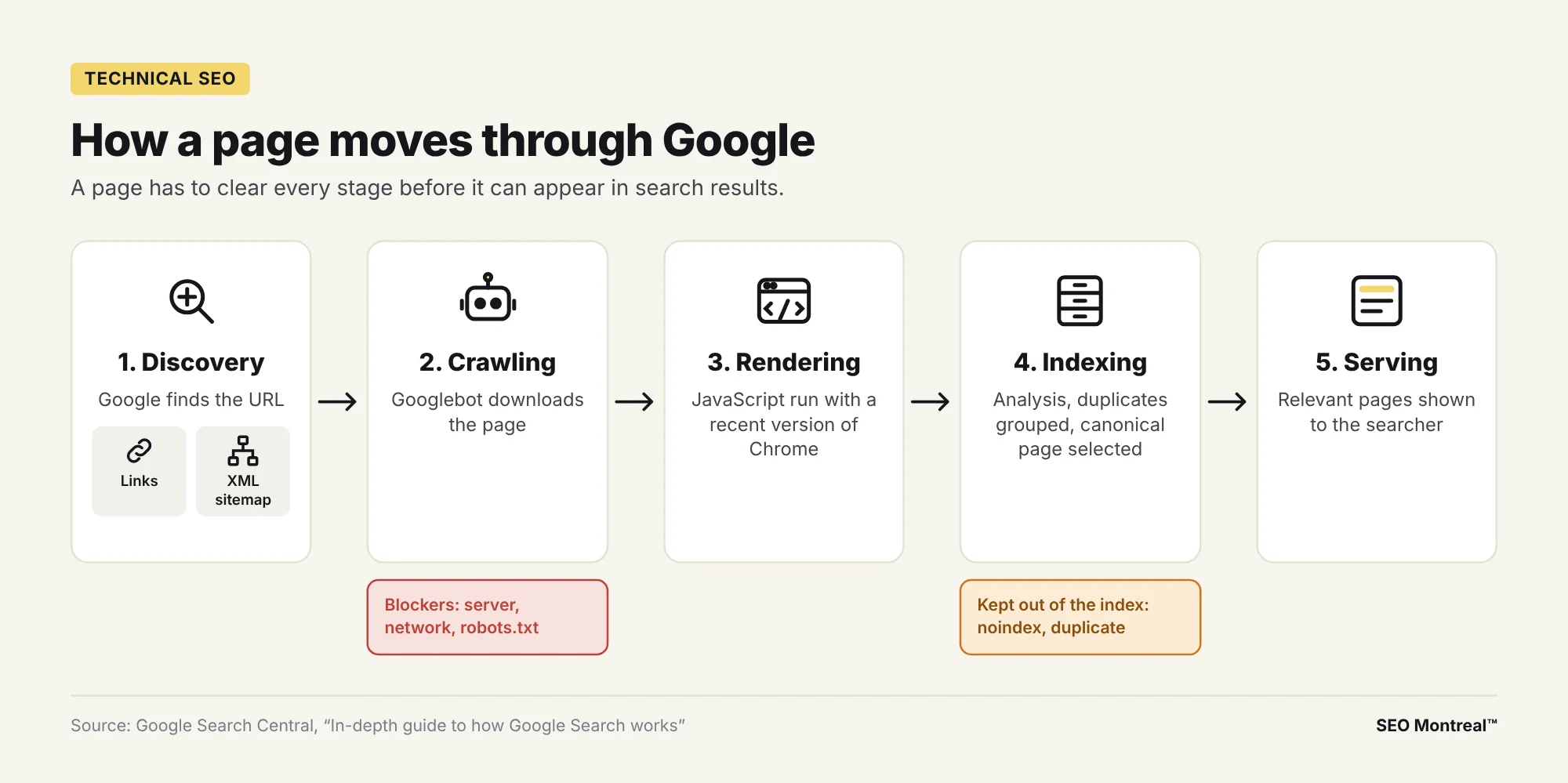
Google describes three stages. During crawling, Googlebot downloads the text, images and videos of the pages it discovers, mostly by following a link from a known page to a new one or by reading a sitemap. During indexing, Google analyzes the content, groups duplicate pages and selects a canonical page: that is the one that may be shown in search results. During serving, when someone searches, Google’s ranking algorithms present the most relevant indexed pages.
Rendering happens between crawling and indexing: Google renders the page and runs its JavaScript using a recent version of Chrome. Text or a menu that only appears after that script therefore goes through one extra step. For important elements (headings, copy, menu links), the safest option is still to serve them directly in the HTML, as text: Google notes that text remains the most reliable way to help it understand a page.
Each stage can fail. Google lists three common crawling problems: an issue with the server, a network issue or a robots.txt rule that blocks Googlebot’s access. A crawled page can also stay out of the index, for example if it carries a noindex tag or if Google treats it as a duplicate of another page. As for crawl budget (the set of URLs Google can and wants to crawl), Google writes its guide for very large sites and for sites whose content changes daily: a small business site generally doesn’t need to worry about it.
Robots.txt and sitemaps: guiding the crawl
Three tools guide crawlers, and they often get mixed up. The robots.txt file and the sitemap act on crawling; the noindex tag acts on the index.
The robots.txt file manages crawling
Placed at the root of the site (example.com/robots.txt), the robots.txt file is used first to manage crawler traffic. Google is clear on this point: the file controls crawling, not whether a page appears in results. A blocked URL can still show up in Google, without a description, if other pages link to it. On WordPress, an SEO plugin such as Yoast SEO or Rank Math lets you edit this file from the dashboard.
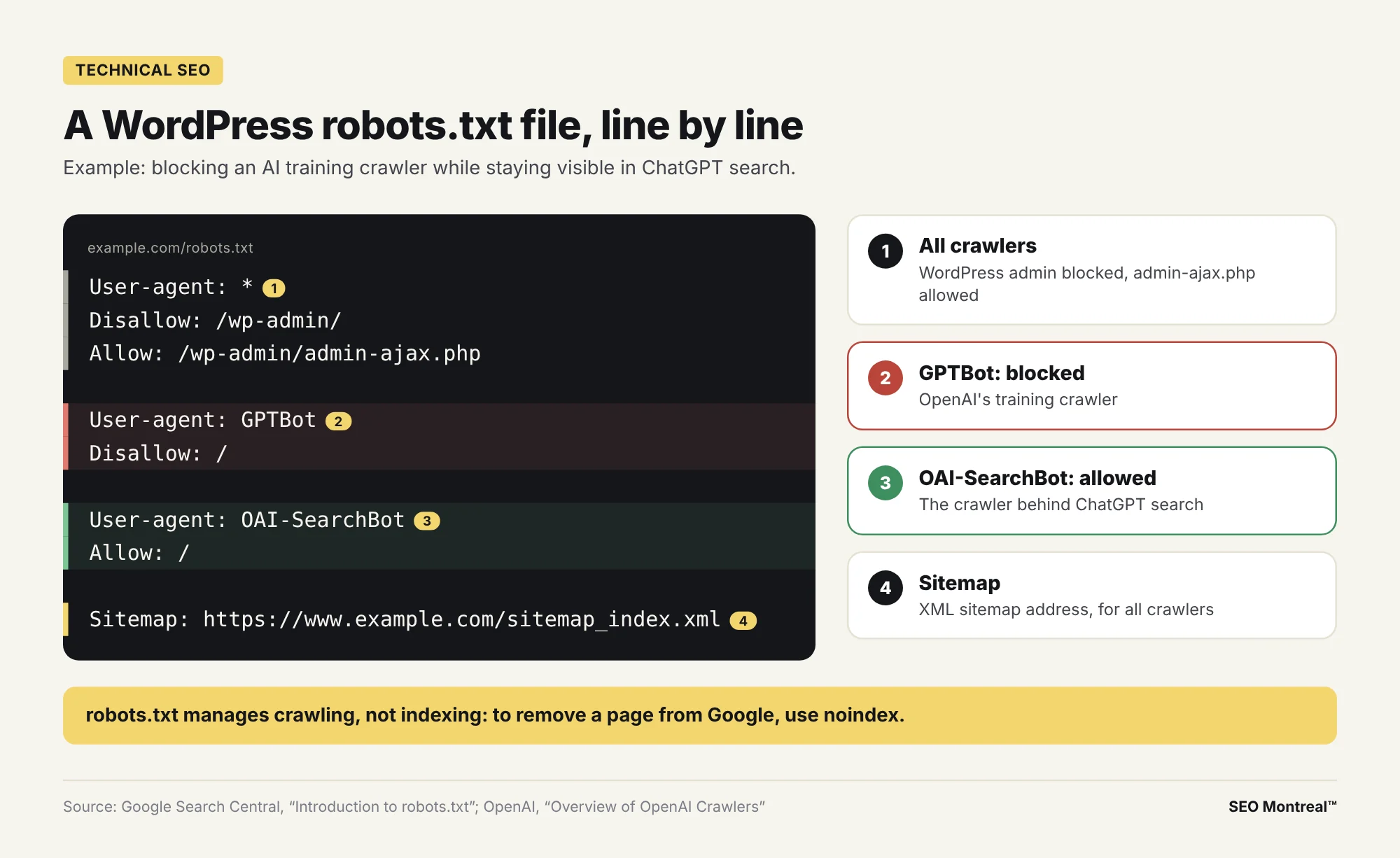
Here is a typical robots.txt for a WordPress site that blocks an AI training crawler while staying visible in ChatGPT search:
User-agent: *
Disallow: /wp-admin/
Allow: /wp-admin/admin-ajax.php

User-agent: GPTBot
Disallow: /

User-agent: OAI-SearchBot
Allow: /

Sitemap: https://www.example.com/sitemap_index.xml
The first group keeps all crawlers out of the WordPress admin area, except admin-ajax.php, a technical file that some plugins need on the public side. The second closes the site to GPTBot. The third explicitly opens it to OAI-SearchBot. The last line gives every crawler the sitemap’s address.
AI crawlers in your robots.txt
AI assistants have their own crawlers, each with a specific role according to its publisher:
- GPTBot (OpenAI) crawls content that may be used to train OpenAI’s generative AI models.
- OAI-SearchBot (OpenAI) surfaces websites in ChatGPT’s search features: according to OpenAI, a site that blocks it won’t be shown in those answers, though it can still appear as a navigational link.
- ClaudeBot (Anthropic) collects content that may be used to train Anthropic’s models, while Claude-SearchBot crawls the web to improve the search results offered to users.
- PerplexityBot (Perplexity) surfaces and links websites in Perplexity’s search results; Perplexity specifies that it is used for search, not for training models.
Blocking a training crawler such as GPTBot or ClaudeBot affects that crawler only: Googlebot follows its own rules. Agents that visit a page at a user’s request, such as ChatGPT-User or Perplexity-User, may however ignore robots.txt, according to their publishers. The right setting depends on your visibility strategy in AI answers, the territory of a GEO agency.
The XML sitemap and the noindex tag
The XML sitemap lists the pages you want crawled. Google treats it as a help, with no guarantee of crawling or indexing. A site of about 500 pages or fewer that is well linked internally can often do without one, according to Google. On WordPress, SEO plugins generate it automatically: what remains is to submit it in Search Console and to remove redirected or broken URLs from it.
To keep a page out of the index (a thank-you page, internal search results), the noindex tag is the tool to use. A classic trap: if robots.txt blocks the page, Googlebot never sees the noindex tag and the URL can stay in search results. Another classic after a launch: the “Discourage search engines from indexing this site” box, under Settings > Reading in WordPress, still checked from the development phase.
301 redirects and HTTP error codes
Every URL responds with an HTTP status code. The ones to know:
- 200: the page responds normally; indexing still has to be earned.
- 301 or 308: permanent move; Google treats it as a strong signal that the new URL should become canonical.
- 302: temporary move, best kept for changes that will be reverted.
- 404 or 410: the page can’t be found; an already indexed URL that returns a 4xx error is removed from the index.
- 500 and other 5xx codes: server error; Googlebot slows down crawling, then drops from the index the URLs that keep returning the error.
- soft 404: an empty or “not found” page that still responds 200, which Search Console reports separately.
Googlebot follows up to 10 redirects in a row, but each hop adds a delay for the visitor. Aim for a single redirect, from the old URL straight to the new one. Also fix the redirect chains that pile up over successive redesigns.
A redirect plan for a redesign
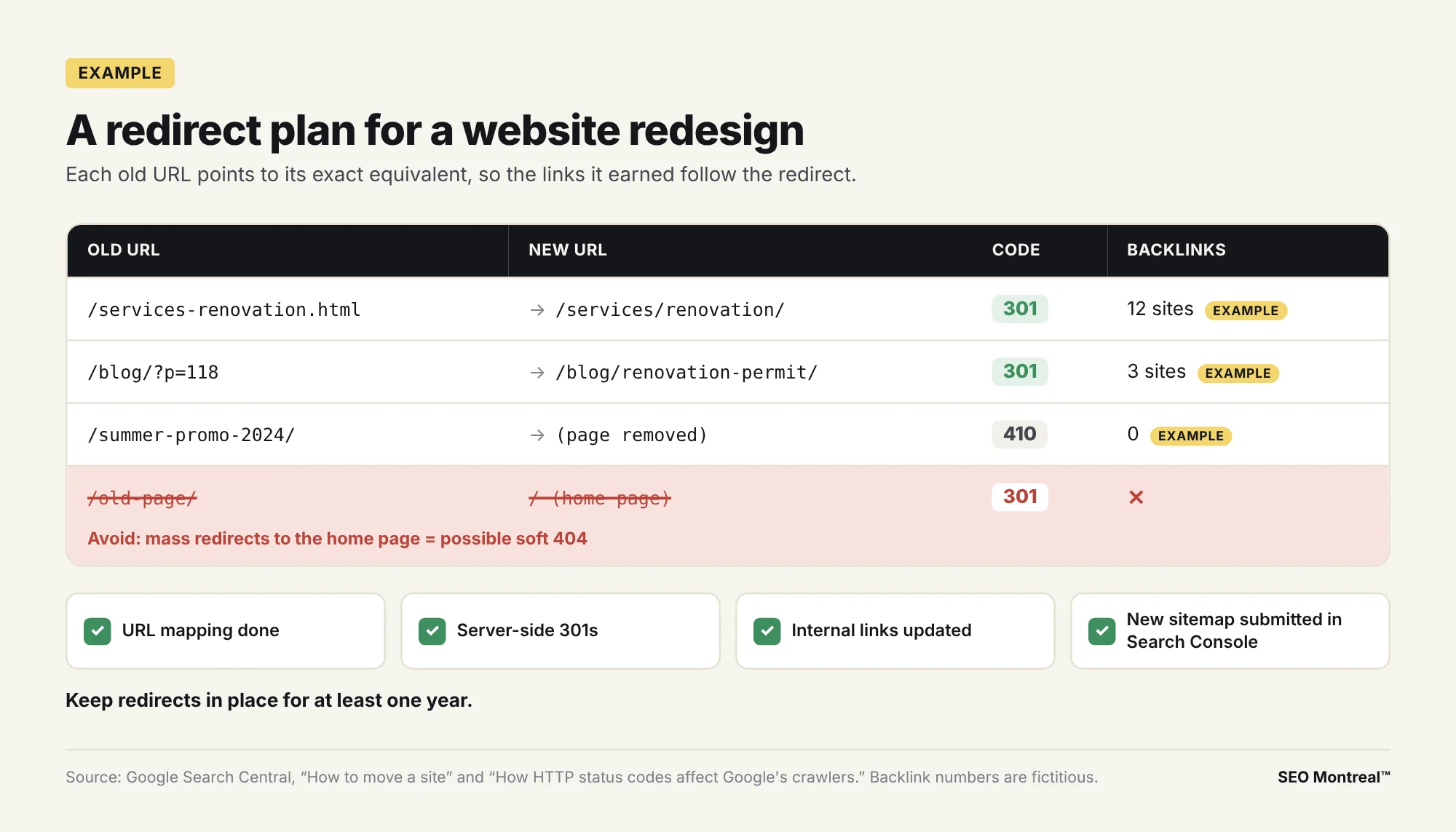
A redesign that changes URLs puts at stake every link the old addresses have earned. Google recommends mapping each old URL to its new one, setting up permanent server-side redirects, updating internal links, then submitting the new sitemap in Search Console. It advises against redirecting many old URLs to a single page (the home page, for example), which it may treat as a soft 404. For your best backlinks, Google even suggests contacting the linking sites and asking them to update their links.
On a website design or redesign project, this mapping table gets prepared before the first mockup. Pages that receive backlinks or organic traffic go first.
Site architecture and internal linking
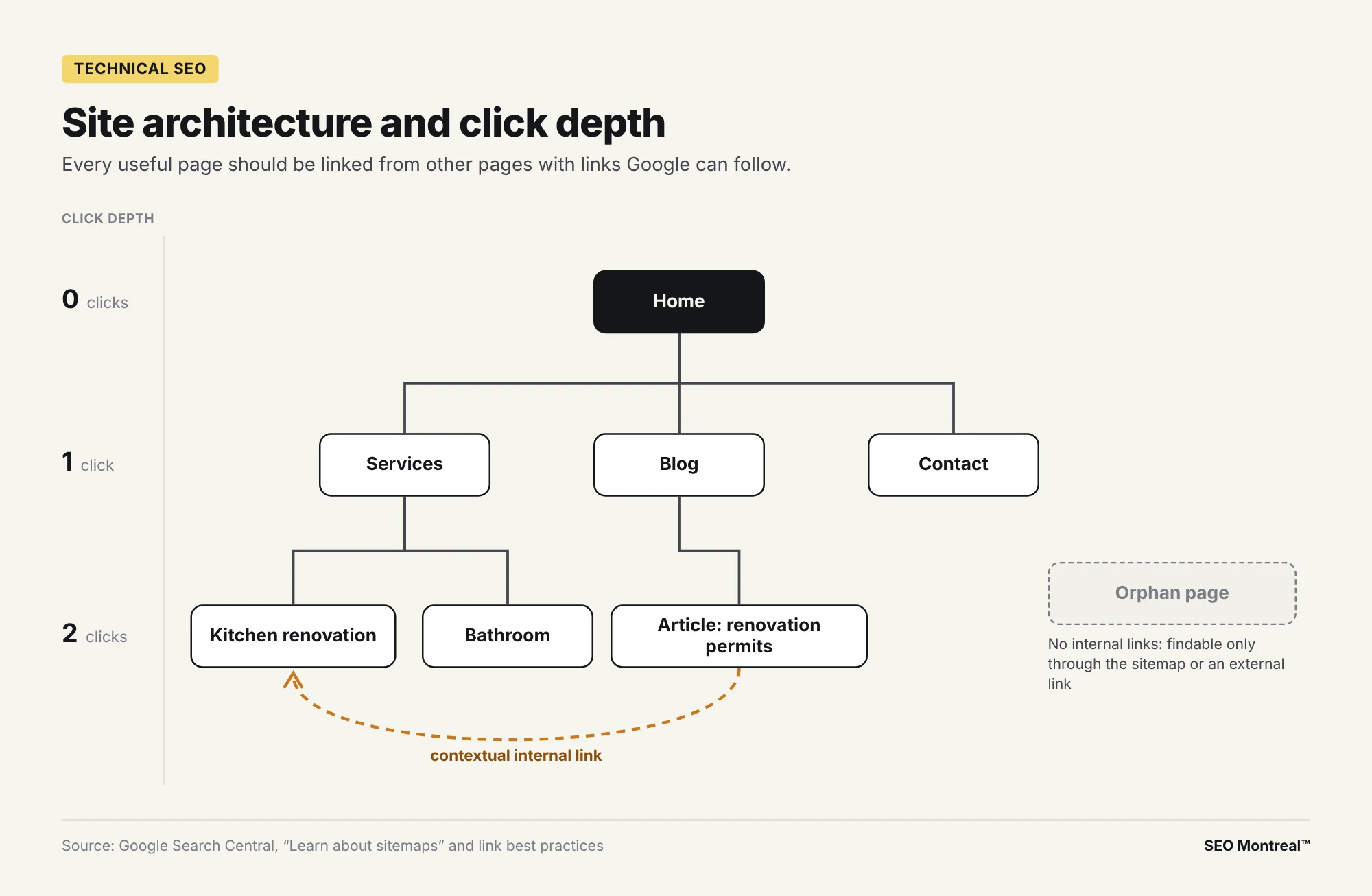
A site’s architecture is the way its pages are organized and connected. A clear site structure starts from the home page, goes through a few main categories, then down to detail pages, with URLs that follow the same logic (example.com/services/kitchen-renovation/). Google says it can find important pages by following links from the home page. Its SEO Starter Guide adds that grouping similar topics in directories can help it learn how often the URLs in each directory change.
Click depth counts the clicks between the home page and a given page. A page with no internal links at all, called an orphan page, depends on the sitemap or on external links to be discovered.
Internal links and anchor text
Google’s link best practices recommend that every important page have a link from at least one other page on the site. It adds that good anchor text “provides context for the link, and sets the expectation for your readers.” In practice: link your service pages from the home page and the menu, point each blog post to the service it explains, then choose anchor text that describes the target page rather than “click here.” Links must be real <a href> elements: Google can generally only crawl links in that format.
Site speed and Core Web Vitals
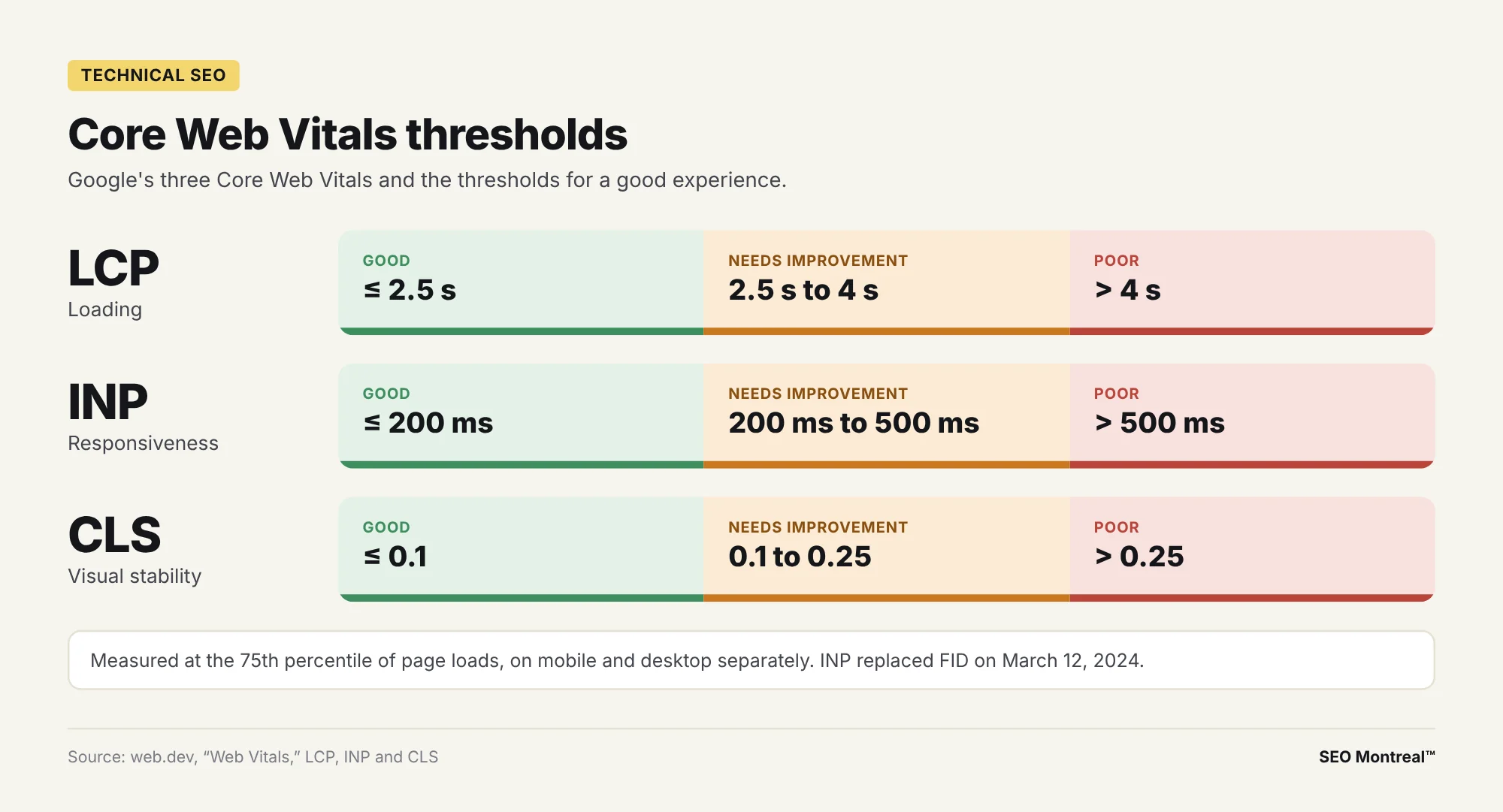
Core Web Vitals measure real user experience, including perceived loading speed:
- LCP (Largest Contentful Paint) measures loading: the largest visible element should render in 2.5 seconds or less.
- INP (Interaction to Next Paint) measures responsiveness: 200 milliseconds or less between an interaction and the page’s visible response.
- CLS (Cumulative Layout Shift) measures visual stability: a score of 0.1 or less, so the page stops jumping around while people read.
Google’s web.dev site sets the target at the 75th percentile of page loads, on mobile and desktop alike. Above 4 seconds for LCP, 500 milliseconds for INP or 0.25 for CLS, the measurement is rated poor. INP replaced FID (First Input Delay) on March 12, 2024: advice that still talks about FID predates that change.
Google confirms that its ranking systems use Core Web Vitals. It also states that a good report doesn’t guarantee a top ranking: when several pages answer a search equally well, a good page experience can make the difference.
Speeding up a WordPress site
On WordPress, the gains often come from the same places: oversized images (to compress and serve as WebP), a missing caching plugin, slow hosting, no content delivery network (CDN) and too many third-party scripts and plugins. Lazy loading suits images further down the page; avoid it on the main image at the top, which often counts toward LCP. Reserve the height of images and banners to limit CLS. Measure before and after each change with PageSpeed Insights.
Mobile and HTTPS, technical SEO prerequisites
Mobile-first indexing
Google uses the mobile version of a site’s content, crawled with the smartphone agent, for indexing and ranking: this is mobile-first indexing. Text, images, links and structured data must therefore be the same on mobile and on desktop. Google recommends responsive design, a single page that adapts to the screen. Text or links removed from the mobile version disappear for Google.
HTTPS and site security
HTTPS encrypts the exchange between the browser and the server with the TLS protocol; an SSL/TLS certificate vouches for the site’s identity. Google announced in August 2014 that it was using HTTPS as a ranking signal, and its guidelines still recommend it. Only one version of the site should respond: on https, with or without www, as you prefer. Every http URL redirects with a 301 to its https version, and internal links point straight to the final version.
Structured data and rich results
Structured data is a standardized format that describes a page’s content: an article, a local business, a product, an event. Google uses this data to understand the page and generally recommends the JSON-LD format, based on the schema.org vocabulary. Some types make a page eligible for rich results, such as a product’s price or breadcrumbs. On WordPress, SEO plugins already add the basic types (Article, Organization, breadcrumbs).
Watch out for outdated advice: the FAQ rich result no longer appears in Google Search since May 7, 2026. The markup is still valid schema.org, but it no longer produces that display. Validate your structured data with Google’s Rich Results Test before every launch.
Duplicate content and canonical URLs
Technical duplicate content rarely comes from copy and paste: it comes from several URLs that show the same page. Examples: http and https, with and without www, tracking parameters (?utm_source=), filters and sorting in an online store, WordPress tag archives. Faced with duplicates, Google picks a canonical page: that is the one that may be shown in search results.
You can steer that choice. Google ranks redirects and the rel=”canonical” tag among strong signals, and the sitemap among weak signals. These methods influence Google’s choice without dictating it. Consolidating duplicates also serves your links: Google then combines the signals, including the links pointing to each variant, on the preferred URL. In an online store, filter and sort URLs are a frequent source of duplicates, common work in e-commerce SEO.
Hreflang: technical SEO for a bilingual site
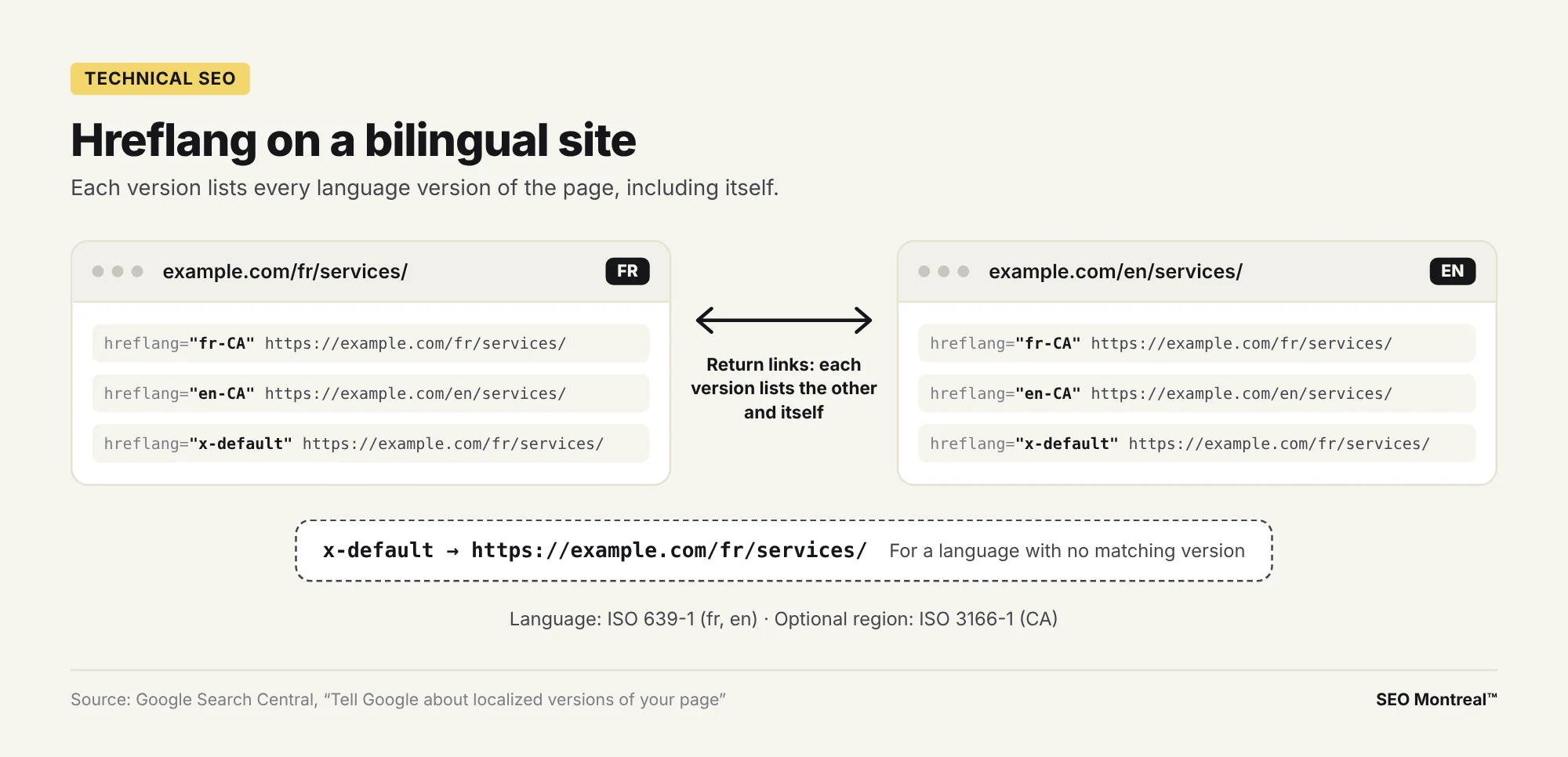
A site offered in French and English, common among Quebec small businesses, has to tell Google which version matches which language. The hreflang tag handles that: each version references itself and lists all the others. Codes follow ISO 639-1 for the language (fr, en), with an optional ISO 3166-1 region code (fr-CA). The x-default value designates the page to show for languages with no match.
<link rel="alternate" hreflang="fr-CA" href="https://www.example.com/fr/services/" />
<link rel="alternate" hreflang="en-CA" href="https://www.example.com/en/services/" />
<link rel="alternate" hreflang="x-default" href="https://www.example.com/fr/services/" />
These three lines go in the <head> section of both the French page and the English page, identically. Google also accepts an HTTP header or the XML sitemap. On WordPress, translation plugins such as WPML or Polylang generate them. A frequently misunderstood point: Google detects a page’s language on its own; hreflang serves to connect the versions to each other.
Which tools diagnose technical SEO issues?
- Google Search Console: the “Page indexing” report shows which pages are indexed and why others are excluded; the URL Inspection tool shows how Google sees a specific page; the “Core Web Vitals” report gathers the Core Web Vitals of real visitors.
- PageSpeed Insights: the Core Web Vitals of a URL, with real-user data and a lab test.
- Lighthouse, in Chrome DevTools: a performance audit right in your browser.
- Google’s Rich Results Test: validates a page’s structured data.
- A crawler such as Screaming Frog: crawls the site the way Googlebot does to find 404 errors, broken links, redirect chains, orphan pages and canonical tags.
- Bing Webmaster Tools: the Bing equivalent of Search Console.
- The site: operator in Google (site:example.com): a quick look at indexing, to confirm in Search Console.
To see the problems these tools surface most often, the article on common SEO mistakes to fix first groups them by family and sets an order for fixing them.
Technical SEO audit checklist
For a small business site, a basic technical audit comes down to thirteen technical optimizations to check:
- only one version of the site responds (https, with or without www); the others redirect with a 301
- robots.txt blocks only what it should and gives the sitemap URL
- the XML sitemap contains only canonical URLs that return 200
- important pages appear in the “Page indexing” report; excluded pages are excluded on purpose
- the WordPress visibility box, under Settings > Reading, is unchecked
- every old URL with backlinks redirects with a 301 to the equivalent page
- redirects lead straight to the destination, with no chain
- every useful page receives internal links with descriptive anchor text
- Core Web Vitals are “good” at the 75th percentile, mobile first
- the mobile version shows the same content as the desktop version
- structured data passes the Rich Results Test
- every French and English page declares its hreflang versions, x-default included
- Search Console and Bing Webmaster Tools are set up, with email alerts
Where to start with technical SEO?
Start with Search Console: the indexing report tells you right away whether your important pages are in Google’s index. Fix what blocks crawling or indexing first, then redirects and lost links, then speed and mobile display. Technical SEO lays the groundwork for everything else on the site. If you would rather hand this work off, SEO Montreal™ handles technical audits and fixes, as a one-off project or within an SEO mandate, directly on your site: tell the team about your site.
Get your technical SEO checked
Book 30 minutes with the team: together, we look at what is holding back your site’s indexing.
FAQ: technical SEO
What is the difference between technical and on-page SEO?
Technical SEO deals with the site’s infrastructure: crawling, indexing, redirects, speed, mobile, HTTPS and code. On-page SEO works on the content of each page: the title tag, the meta description, the headings, the copy and the internal links. The two often overlap. A poorly written title tag is an on-page issue; hundreds of identical titles generated by a template are a technical one.
Is technical SEO enough to rank on Google?
No. It makes your pages accessible and readable, but organic rankings also depend on relevant content and on off-page SEO, meaning the links your site earns. Google describes links as a relevance signal and PageRank as one of its core ranking systems. A technically flawless site with no useful content or backlinks stays hard to find. Technical work lays the base; content and links build on it.
How often should you run a technical SEO audit?
Run a full audit before and after any redesign, migration, theme change or major plugin install on WordPress. In between, watch Search Console alerts and the Page indexing report to catch 404 errors, excluded pages and drops in Core Web Vitals. A site that publishes often, or an online store with many products, needs closer monitoring.
Should you block GPTBot in robots.txt?
It’s a business decision. According to OpenAI, GPTBot crawls content that may be used to train its models; blocking it signals that your content should stay out of that training. OAI-SearchBot is a separate crawler that surfaces sites in ChatGPT search: a site that blocks it no longer appears in those answers, except as a navigational link. You can block one and allow the other, line by line in robots.txt.
Is an XML sitemap required?
It’s optional, but useful on most sites. Google says a site of about 500 pages or fewer, well linked internally, can often do without one. A sitemap mainly helps large sites, new sites with few backlinks and sites that publish often. It is a help without a guarantee: it points Google to pages, then Google decides whether to crawl and index them.
Do Core Web Vitals affect your rankings in Google?
Yes: Google confirms that its ranking systems use them. Their weight should be kept in perspective, since a good Core Web Vitals report doesn’t guarantee a top position and the most relevant content can rank with an average experience. The thresholds to aim for at the 75th percentile: LCP of 2.5 seconds or less, INP of 200 milliseconds or less and CLS of 0.1 or less.
How do you do technical SEO on WordPress?
WordPress already covers a good share of the basics. An SEO plugin such as Yoast SEO or Rank Math handles the XML sitemap, robots.txt, canonical tags and basic structured data. Then check the visibility box under Settings > Reading, the permalink structure, a caching plugin, image compression and redirect management for every URL you change.
Is FAQ structured data still useful?
For Google, the FAQ rich result no longer appears in Search since May 7, 2026; Google then removed its documentation for the feature in June 2026. FAQPage markup is still valid schema.org and describes the page to tools that read it, but it no longer produces a special display in Google. Other types, such as Article, Organization or breadcrumbs, remain useful.
Find your technical SEO opportunities
Get a first analysis of your site, 100% free.